NOTICE: Infinity N5.2 and N5 FAQ 0.0.0
The wiki has been updated to include the N5.2 changes and the v0.0.0 FAQ.
List of wiki pages updated in N5.2.
Difference between pages "Trooper Activation" and "Rolls"
(Errata 1.3, position box) |
m (Fixed some spacing and link issues.) |
||
| Line 1: | Line 1: | ||
| − | {{ | + | {{n5-section-basic-rules}} |
| − | + | Infinity uses 20-sided dice (commonly known as '''d20''') to determine whether specific actions are successful. For example, players roll dice to find out whether their Troopers succeed in hitting their target in ranged combat, hacking into enemy systems, discovering a hidden enemy, etc. | |
| − | |||
| − | ' | + | Infinity's game mechanics revolve around two types of d20 rolls: '''[[#Normal Rolls | Normal Rolls]]''' and '''[[Face to Face Rolls]]. |
| − | ''' | + | === Successful Roll === |
| + | Troopers and game Elements have a series of [[Attributes]] that define their capabilities to perform different game actions. Rolls are made against the '''Success Value (SV)''', the numeric value resulting from applying the relevant Modifiers (both negative and positive) to the Attribute used for the Skill. | ||
| − | ''' | + | To find out if a Skill has succeeded, a d20 is rolled and the result is compared to the Success Value. '''Any result that is equal to or lower than''' the Success Value means that the Skill was successful. |
| + | == Modifiers (MOD) == | ||
| + | In most cases, the circumstances of an action apply [[Modifiers Explained | Modifiers ('''MODs''')]] to the relevant Attribute before a roll is made. MODs, by increasing or decreasing the numeric value of an [[Attribute]], denote the difficulty of the Skill at hand. A positive MOD applies when the Skill performed is easier than usual, and a negative MOD makes the Skill harder than usual. | ||
| − | {{ | + | {{important-start}} |
| − | + | Whenever a rule mentions the value of an [[Attribute]], consider it to mean the Success Value, obtained after applying all MODs.{{important-end}} | |
| − | |||
| − | {{ | ||
| − | |||
| + | {{greybox-start | Maximum Modifier}} | ||
| + | The sum total of the Modifiers applied to a Roll can never exceed +12 or -12. Any Modifier that adds up to more than +12 or less than -12 is ignored and replaced by the maximum MOD of +12 or -12, as appropriate. | ||
| + | {{greybox-end}} | ||
| − | |||
| − | |||
| − | |||
| − | |||
| + | The most commonly used MODs are: | ||
| + | * '''[[Range]]:''' can modify the [[BS]], [[PH]], and [[WIP]] Attributes. | ||
| + | * '''[[Cover]]:''' can modify [[BS]], [[PH]], [[WIP]], and [[Saving Rolls]]. | ||
| + | * '''[[Skills]], [[Weapons]] and [[Equipment]]:''' can modify several different [[Attributes]]. | ||
| − | |||
| − | |||
| − | |||
| + | Different Modifiers (MOD) may appear in the '''[[Unit Profiles]]'''. | ||
| − | {{ | + | {{modifiers-explained}} |
| − | |||
| − | |||
| − | |||
| − | |||
| − | |||
| − | |||
| − | |||
| + | {{remember-start}} | ||
| + | Rounding: | ||
| − | = | + | In Infinity, any time a number (a result on a die, an [[Attribute]], a MOD...) is divided and rounded to an integer, it is always rounded up. For example, half of 5 (5 / 2 = 2.5) would be 3. |
| − | {{ | + | {{remember-end}} |
| − | |||
| − | {{ | + | === Maximum Modifier Example === |
| + | {{greybox-start | Maximum Modifier Example}} | ||
| + | {{image | name=n5/n5-eng-maximum-modifier.jpg | style=fullborder }} | ||
| − | + | {{n5_weapon_single}} | |
| − | + | {{n5_weaponrow|Combi Rifle|+3|+3|-3|-3|-6|-6|--|7|3|N|ARM|1|[[Suppressive Fire Trait | Suppressive Fire]]}} | |
| − | + | |} | |
| − | |||
| − | + | Trooper A declares: [[Move]] + [[BS Attack]] with his Combi Rifle. His BS Attack will apply the following MODs: | |
| − | + | * -6 for Trooper B's [[Mimetism]]. | |
| − | + | * -3 for [[Cover]]. | |
| − | + | * -6 for [[Range]]. | |
| − | + | The total sum of Modifiers is -15. | |
| − | + | Given that the maximum MOD is -12, the Success Value (SV) will be 13 - 12 = 1. | |
| − | + | {{greybox-end}} | |
| − | |||
| − | |||
| − | |||
| − | |||
| − | |||
| − | + | == Criticals == | |
| + | '''Criticals''' represent the improved outcomes of actions that resulted in an exceptional success. When the result on the die matches the Success Value (remember: the value of the Attribute with all MODs applied), the action is a Critical success. The goal of the action was achieved in the best possible way. A perfect success, congratulations! | ||
| − | + | In [[Face to Face Rolls]], '''Criticals''' always win, regardless of the rival's results. If both players get one or more Criticals, the Face to Face Roll is a tie and both Troopers are considered to have failed | |
| − | |||
| − | + | {{see-also-start}} | |
| + | '''[[Combat_Module_Intro#Criticals|Criticals and Attacks]]''' | ||
| + | {{see-also-end}} | ||
| − | |||
| − | |||
| − | + | == Success Value Below 1 == | |
| − | + | Negative MODs can sometimes cause the Success Value to drop below 1 for an action. In these cases, the player does not roll the dice, and the Roll '''fails automatically'''. | |
| − | |||
| − | |||
| − | + | == Attributes and Success Value Above 20 == | |
| + | IIn other cases, an [[Attribute]] can be higher than 20, or the total positive MOD added to the Attribute can make the Success Value exceed 20. | ||
| − | + | A Success Value over 20 increase the chances of rolling a Critical success. The amount over 20 indicates the possible results on the die roll that, in addition to a 20, will give a Critical success. For instance, with a Success Value of 23, a Critical success is achieved when rolling a 20, but also when rolling a 1, 2, or 3 on the die. | |
| − | |||
| − | |||
| − | == | + | === Example of an Attribute and Success Value Over 20 === |
| − | + | {{greybox-start | Example of an Attribute and Success Value Over 20}} | |
| + | A Trooper has a Close Combat ([[CC]]) Attribute value of 24. Therefore, as their Success Value is 24, any result in a Normal Roll is a success. In addition, any roll of 20, 1, 2, 3, or 4 on the die is a Critical success. | ||
| + | {{greybox-end}} | ||
| − | |||
| − | + | == Normal Roll == | |
| − | + | Normal Rolls are the most common, basic dice rolls in Infinity. This roll is used when a Trooper is not facing off against an enemy, but instead must check if they successfully use an uncontested or passively contested Skill (such as trying to [[Discover]] a [[camouflaged]] [[enemy]] or healing an [[allied | ally]] by means of the [[Doctor]] Special Skill). | |
| − | |||
| − | + | To make a '''Normal Roll''' and find out if '''a Trooper is successful''' when performing a Skill, simply roll one d20 and compare the result against the Success Value of the relevant [[Attribute]] of the Trooper performing the action. If the '''result''' on the die is '''equal to or lower than the Success Value''', the Skill is successful, and the Trooper achieves its goal. | |
| − | |||
| − | |||
| − | |||
| − | |||
| − | + | === Normal Roll Example === | |
| − | + | {{greybox-start | Normal Roll Example}} | |
| − | + | The Fennec Fusilier’s [[BS]] Attribute is 12 and he has to make a Normal BS Roll with a -3 MOD, with a BS Success Value of 9, so he rolls a d20 and gets an 8. Since the Fennec’s Success Value is 9, the roll is a success. Later on, this Fusilier tries another Normal BS Roll, but this time he gets a 12. As the Success Value is 9, the Fennec fails the roll. | |
| + | {{greybox-end}} | ||
| − | |||
| − | |||
| − | |||
| − | |||
| − | |||
| − | |||
| − | |||
| − | |||
| − | |||
| − | |||
| − | |||
| − | |||
| − | + | {{n5-section-basic-rules}} | |
| − | |||
| − | |||
| − | |||
| − | |||
| − | |||
| − | |||
| − | |||
| − | |||
| − | |||
| − | |||
| − | |||
| − | |||
| − | |||
| − | |||
| − | |||
| − | |||
| − | |||
| − | |||
| − | |||
| − | |||
| − | |||
| − | |||
| − | |||
| − | |||
| − | |||
| − | |||
| − | |||
| − | |||
| − | |||
| − | |||
| − | |||
| − | |||
| − | |||
| − | |||
| − | |||
| − | |||
| − | |||
| − | |||
| − | |||
| − | |||
| − | |||
| − | |||
| − | |||
| − | |||
| − | |||
| − | |||
| − | |||
| − | |||
| − | |||
| − | |||
| − | |||
| − | |||
| − | |||
| − | |||
| − | |||
| − | |||
| − | |||
| − | |||
| − | |||
| − | |||
| − | |||
| − | |||
| − | |||
| − | |||
| − | |||
| − | |||
| − | |||
| − | |||
| − | |||
| − | |||
| − | |||
| − | |||
[[Category:Basic Rules]] | [[Category:Basic Rules]] | ||
Revision as of 15:08, 19 May 2025
Open and Private Information | Unit Profile | Army List | Orders and the Order Pool | Trooper Activation | ARO: Automatic Reaction Order | Order Expenditure Sequence | Initiative and Deployment | Game Sequence | Loss of Lieutenant | Silhouettes | Line of Fire | Zone of Control | Zones, Bases and Silhouettes | Coherency | Distances and Measurements | Replacing Game Elements | Rolls | Face to Face Rolls
Infinity uses 20-sided dice (commonly known as d20) to determine whether specific actions are successful. For example, players roll dice to find out whether their Troopers succeed in hitting their target in ranged combat, hacking into enemy systems, discovering a hidden enemy, etc.
Infinity's game mechanics revolve around two types of d20 rolls: Normal Rolls and Face to Face Rolls.
Successful Roll
Troopers and game Elements have a series of Attributes that define their capabilities to perform different game actions. Rolls are made against the Success Value (SV), the numeric value resulting from applying the relevant Modifiers (both negative and positive) to the Attribute used for the Skill.
To find out if a Skill has succeeded, a d20 is rolled and the result is compared to the Success Value. Any result that is equal to or lower than the Success Value means that the Skill was successful.
Modifiers (MOD)
In most cases, the circumstances of an action apply Modifiers (MODs) to the relevant Attribute before a roll is made. MODs, by increasing or decreasing the numeric value of an Attribute, denote the difficulty of the Skill at hand. A positive MOD applies when the Skill performed is easier than usual, and a negative MOD makes the Skill harder than usual.
The sum total of the Modifiers applied to a Roll can never exceed +12 or -12. Any Modifier that adds up to more than +12 or less than -12 is ignored and replaced by the maximum MOD of +12 or -12, as appropriate.
The most commonly used MODs are:
- Range: can modify the BS, PH, and WIP Attributes.
- Cover: can modify BS, PH, WIP, and Saving Rolls.
- Skills, Weapons and Equipment: can modify several different Attributes.
Different Modifiers (MOD) may appear in the Unit Profiles.
Any MOD or value in round brackets next to a Special Skill,Weapon, or Equipment—such as CC Attack (+3), Combat Jump (PH=10), BS Attack (+3), CC Weapon (PS=6), Combi Rifle (+1B), etc.—only applies when using the Skill, Weapon, or Equipment.
- Positive MODs only apply to the user.
- Negative MODs only apply to enemies.
- Negative MODs for Automatic Skills and Equipment such as Mimetism (-6), or Surprise Attack (-3) always apply the MOD as specified in their rules.
- Negative MODs for other Skills, Weapons, and Equipment such as Dodge (-3), or CC Attack (-3) only apply during Face to Face Rolls.
- "ReRoll" in round brackets next to a Skill, Weapon, or Equipment will allow the user to reroll one die from the Roll, only when using that Skill, Weapon, or Equipment.
- "+1 SD" or "+1 Special Die" in round brackets next to a Skill, Weapon, or Equipment allows the player to roll one extra die, and then select and discard one die from the Roll. This extra die does not increase the Burst value of the Special Skill, Weapon, or Equipment, and does not expend additional Disposable uses. If distributing Burst between several targets, the extra die must be allocated to one of those targets, and a die discarded from the Roll against that target.
- If used in a Face to Face Roll, a die is selected and discarded after both players have rolled. If both players have to select and discard a die, the Active Player selects first.
- This MOD applies in both Active and Reactive Turns.
- This MOD cannot be applied to Long Skills. Also, it cannot be applied to Skills, Weapons, or Equipment that do not require a Roll, for example, Direct Template Weapons.
As a general rule, if these Modifiers (MODs) affect Burst (B), they are only applied during the Active Turn.
The maximum Burst (B) value of any Attack is 6, no matter how many MODs to B are applied. The extra dice for "+1SD" do not count towards this maximum, as they do not increase the Burst value.
MODs imposed by Skills, Special Skills, or pieces of Equipment may be applied to their users, or to those enemy Troopers acting against them, in several different ways. For example:
BS Attack (+1B) means that, when its user declares a BS Attack in their Active Turn, they must apply a +1 MOD to their BS Weapon's Burst. They may not, however, apply this MOD during their Reactive Turn if they declare a BS Attack ARO.
BS Attack (Shock) means that the user adds Shock Ammunition to all their BS Attacks.
Mimetism (-3) means that a Trooper declaring BS Attack or Discover against the user must apply an additional -3 MOD to their Roll.
Combat Jump (PH=10) means that, when performing the PH Roll required by this Skill, a PH value of 10 must be applied instead of the user's PH Attribute.
ECM (Hacking -3) means that a Trooper declaring a Hacking Program against the user must apply an additional -3 MOD to their Roll.
Immunity (POS) means that the user cannot enter the Possessed State.
Heavy Rocket Launcher (PS=5) means that the PS of this Weapon is 5 in all usage Modes, regardless of the different PS values listed in the Weapons Chart for its Modes.
Update PDF 5.2, October 2025
Dodge (-3) means that, when the user declares Dodge, the opponents in any Face to Face Rolls suffer a -3 MOD.
BS Attack (Continuous Damage) means that the user applies the Continuous Damage Trait to all their BS Attacks.
BS Attack (SR-1) means that, when the user declares BS Attack, their targets apply a -1 MOD to their Saving Rolls against the user’s hits.
Rounding:
In Infinity, any time a number (a result on a die, an Attribute, a MOD...) is divided and rounded to an integer, it is always rounded up. For example, half of 5 (5 / 2 = 2.5) would be 3.
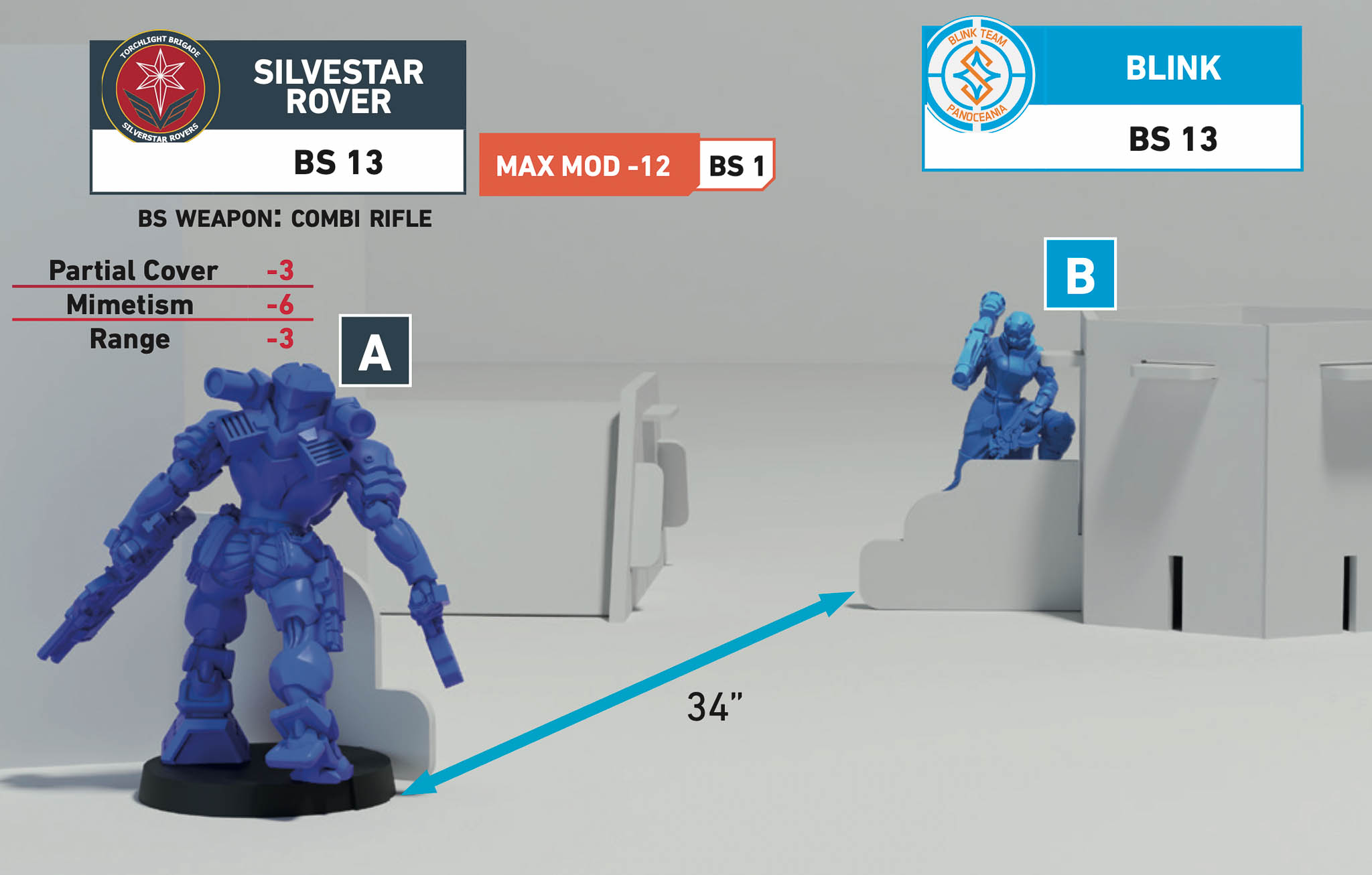
Maximum Modifier Example
| Name | 8" | 16" | 24" | 32" | 40" | 48" | 96" | PS | B | Ammo | Save Attr. | Save Rolls | Traits |
|---|---|---|---|---|---|---|---|---|---|---|---|---|---|
| Combi Rifle | +3 | +3 | -3 | -3 | -6 | -6 | -- | 7 | 3 | N | ARM | 1 | Suppressive Fire |
Trooper A declares: Move + BS Attack with his Combi Rifle. His BS Attack will apply the following MODs:
The total sum of Modifiers is -15.
Given that the maximum MOD is -12, the Success Value (SV) will be 13 - 12 = 1.
Criticals
Criticals represent the improved outcomes of actions that resulted in an exceptional success. When the result on the die matches the Success Value (remember: the value of the Attribute with all MODs applied), the action is a Critical success. The goal of the action was achieved in the best possible way. A perfect success, congratulations!
In Face to Face Rolls, Criticals always win, regardless of the rival's results. If both players get one or more Criticals, the Face to Face Roll is a tie and both Troopers are considered to have failed
Success Value Below 1
Negative MODs can sometimes cause the Success Value to drop below 1 for an action. In these cases, the player does not roll the dice, and the Roll fails automatically.
Attributes and Success Value Above 20
IIn other cases, an Attribute can be higher than 20, or the total positive MOD added to the Attribute can make the Success Value exceed 20.
A Success Value over 20 increase the chances of rolling a Critical success. The amount over 20 indicates the possible results on the die roll that, in addition to a 20, will give a Critical success. For instance, with a Success Value of 23, a Critical success is achieved when rolling a 20, but also when rolling a 1, 2, or 3 on the die.
Example of an Attribute and Success Value Over 20
A Trooper has a Close Combat (CC) Attribute value of 24. Therefore, as their Success Value is 24, any result in a Normal Roll is a success. In addition, any roll of 20, 1, 2, 3, or 4 on the die is a Critical success.
Normal Roll
Normal Rolls are the most common, basic dice rolls in Infinity. This roll is used when a Trooper is not facing off against an enemy, but instead must check if they successfully use an uncontested or passively contested Skill (such as trying to Discover a camouflaged enemy or healing an ally by means of the Doctor Special Skill).
To make a Normal Roll and find out if a Trooper is successful when performing a Skill, simply roll one d20 and compare the result against the Success Value of the relevant Attribute of the Trooper performing the action. If the result on the die is equal to or lower than the Success Value, the Skill is successful, and the Trooper achieves its goal.
Normal Roll Example
The Fennec Fusilier’s BS Attribute is 12 and he has to make a Normal BS Roll with a -3 MOD, with a BS Success Value of 9, so he rolls a d20 and gets an 8. Since the Fennec’s Success Value is 9, the roll is a success. Later on, this Fusilier tries another Normal BS Roll, but this time he gets a 12. As the Success Value is 9, the Fennec fails the roll.
Open and Private Information | Unit Profile | Army List | Orders and the Order Pool | Trooper Activation | ARO: Automatic Reaction Order | Order Expenditure Sequence | Initiative and Deployment | Game Sequence | Loss of Lieutenant | Silhouettes | Line of Fire | Zone of Control | Zones, Bases and Silhouettes | Coherency | Distances and Measurements | Replacing Game Elements | Rolls | Face to Face Rolls